
Download WindowTabs – window management, tabbed workspace, desktop organization, productivity tool, taskbar integration, portable app
Overview
WindowTabs is a productivity-focused utility designed to streamline desktop workflows by introducing a tabbed interface for managing multiple application windows. Targeted at users seeking enhanced organization on Windows systems, the app addresses the common challenge of desktop clutter caused by numerous open windows. By enabling users to group related applications into tabs—similar to how web browsers manage multiple pages—WindowTabs simplifies navigation and reduces visual noise on the desktop. This tool is especially beneficial for professionals who frequently work with multiple programs simultaneously, such as those using Microsoft Office, Adobe Creative Suite, or other desktop-based tools.
Although the developer did not provide additional background information, the app’s longevity since its release on December 6, 2012, indicates a stable and reliable presence in the productivity software space. The fact that it remains free and accessible suggests a commitment to user accessibility. Real-world use cases include researchers managing several browser tabs alongside reference documents, designers working across multiple Adobe applications, and remote workers maintaining consistent workspace setups across different machines. Its role in the broader software ecosystem lies in bridging the gap between traditional window management and modern, browser-like interface efficiency.
Key Features & Functionality
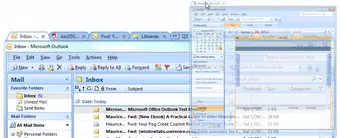
- Tabbed Organization: Users can group open application windows into tabs, creating a consolidated workspace. This mimics the tabbed navigation found in web browsers, allowing for faster switching between related tasks without the need to minimize or hide windows.
- Portable Version: A standalone, installation-free version enables users to run WindowTabs directly from a USB drive. This feature supports on-the-go productivity and ensures consistent workspace settings across different computers.
- Windows 7 Taskbar Integration: The app integrates with the Windows 7 taskbar, grouping application buttons under a single tabbed icon. This reduces taskbar congestion and streamlines window switching, improving overall workflow efficiency.
- Multi-Application Support: WindowTabs is compatible with a wide range of desktop applications, including Microsoft Office, Adobe products, and other commonly used software. This broad compatibility enhances its utility across diverse professional environments.
- Drag-and-Drop Simplicity: The interface relies on intuitive drag-and-drop mechanics to organize windows into tabs. Users can easily rearrange or reassign windows with minimal effort, making the setup process quick and accessible even for non-technical users.
For example, a graphic designer might group Photoshop, Illustrator, and a reference PDF into a single tab, allowing seamless transitions between tools. Similarly, a student could organize lecture notes, a web browser, and a word processor into one tab for focused study sessions. These practical applications highlight how the app enhances daily productivity without requiring complex configurations.
Interface, UX & Performance
The user interface of WindowTabs is minimalistic and focused on functionality, prioritizing ease of use over visual flair. The main window displays a clean list of active tabs, each representing a group of open applications. Navigation is straightforward: users simply drag a window’s title bar into a tab group to assign it. The layout is optimized for quick access, with minimal distractions.
Although the developer did not list formal performance metrics, the app’s lightweight nature—only 2.3 MB in size—suggests efficient resource usage. It is designed to run smoothly on systems with limited processing power or memory, making it suitable for older or low-end machines. Responsiveness is maintained through direct system-level integration, particularly with the Windows 7 taskbar, ensuring that switching between tabs is near-instantaneous.
Stability appears consistent, given the app’s long-standing availability. However, no specific information was provided regarding crash rates, memory leaks, or compatibility with newer Windows versions. Users should be aware that the app was originally developed for Windows 7, and while it may function on later versions, full compatibility is not guaranteed.
Platform Compatibility & Technical Requirements
WindowTabs is available exclusively for the Windows platform. The current version is 1.1.2, with a file size of 2.3 MB. The developer did not specify minimum OS requirements or compatibility details beyond the platform name. As such, it is unclear whether the app supports Windows 8, 10, or 11. However, its original design for Windows 7 suggests it may function best on older systems.
The portable version allows execution without installation, making it ideal for users who need to run the app on shared or restricted machines. This feature enhances flexibility, particularly in educational or corporate environments where software installation is restricted. No additional hardware or software dependencies were listed.
Pros and Cons
Pros
- Free to download and use with no hidden costs
- Lightweight file size (2.3 MB) ensures fast loading and low system impact
- Portable version enables use on any PC without installation
- Intuitive drag-and-drop interface for easy window organization
- Seamless integration with the Windows 7 taskbar for improved workflow
Cons
- Developer did not provide information about compatibility with Windows 10 or 11
- Original release in 2012 may indicate outdated design or missing modern UI features
- No official update frequency or release notes were disclosed
- Specific technical requirements, such as RAM or CPU, were not listed
- Support for newer operating systems remains uncertain
FAQ
Is WindowTabs safe to download and use?
Yes, the app is free and does not require installation. However, as with any third-party software, users should download it from official or trusted sources to ensure security.
Can I use WindowTabs on Windows 10 or 11?
The developer did not specify compatibility with Windows 10 or 11. While it may function on these systems, it was originally designed for Windows 7, so performance may vary.
Is there a mobile version of WindowTabs?
No, WindowTabs is a desktop application designed for Windows systems. There is no mobile version available for Android or iOS.
Does WindowTabs require an internet connection?
No, the app operates offline. The portable version can be used without internet access, making it suitable for secure or restricted environments.
How do I update WindowTabs?
As the developer did not provide update information, users should check the official website periodically for new releases. No automatic update feature was mentioned.
Final Thoughts
WindowTabs remains a niche yet effective tool for users who value a clean, tabbed desktop environment. Its ability to organize multiple windows into manageable groups—combined with a portable, installation-free version—makes it a practical choice for professionals and students alike. While its age and lack of modern updates may be limitations, its core functionality continues to deliver tangible benefits in workflow efficiency. For anyone struggling with desktop clutter on Windows 7 or older systems, WindowTabs offers a simple, reliable solution. Its minimal footprint and zero cost further enhance its appeal.
Download WindowTabs now


